Check the labels
The AI gives every animal a species. Some will be wrong. This page shows how to find the mistakes quickly instead of clicking through every photo. Checking is optional, but recommended. If you plan to report the numbers, check at least the species you will report on.
Video tutorial
Prefer to watch? This video shows how to find and fix wrong labels quickly.
The grid
The Labels page shows one card per detection: the cropped animal and the species the AI chose. A progress bar shows how much of the project you have checked.
Detections and files
The page has two tabs. Detections shows one card per box the AI found above your detection threshold. Files shows one card per file, photo or video, with its boxes drawn on it. They are two views of the same work: a box you verify in Detections counts towards its file, and a file you verify in Files takes its boxes out of Detections.
Use Files to judge whole pictures: check that the AI did not miss anything, and fix a file with several animals in one go. It opens sorted by folder, so one camera's files sit together and you can scan them quickly. To see only the files where the AI found nothing, set the Empty filter under More filters to "Show only empty".
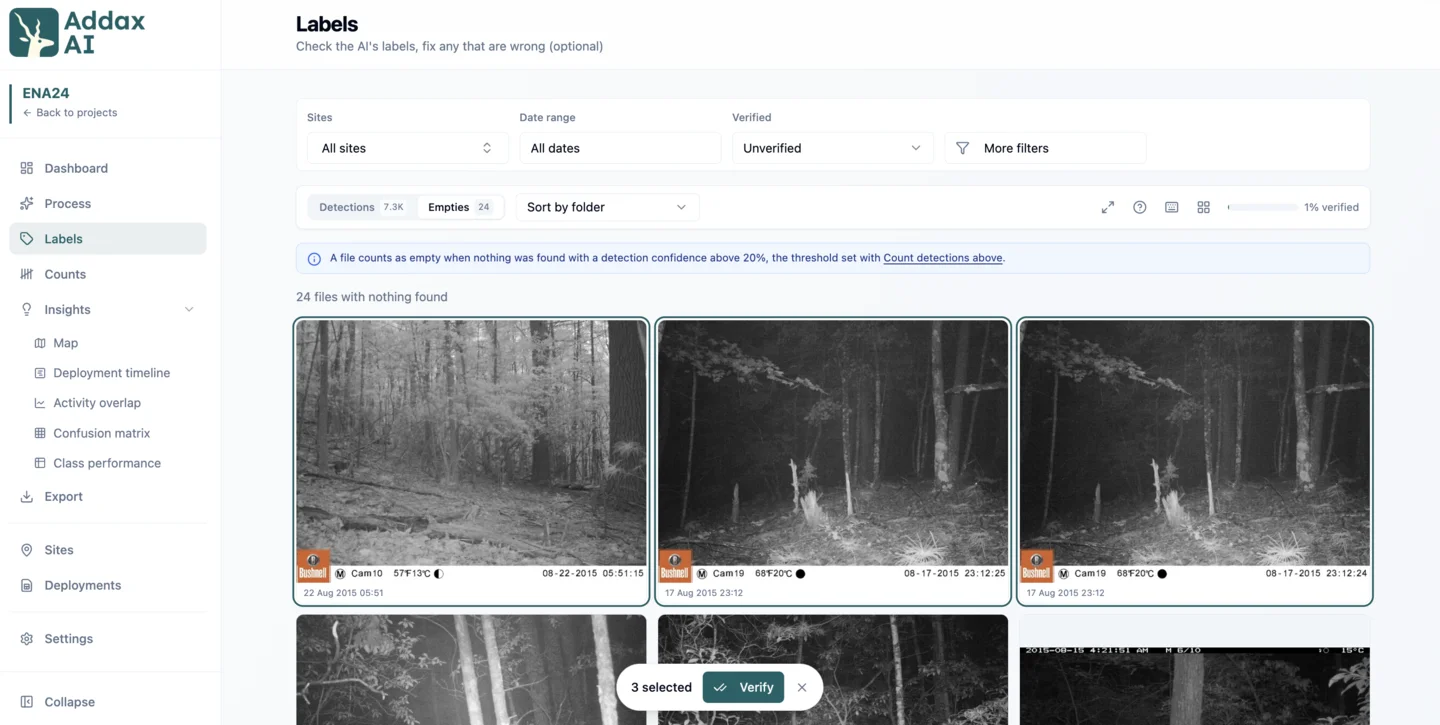
Select the files that are right and click Verify to sign them off in one go. Double-click a file to see it full size, where Enter verifies it and takes you to the next one you have not checked. Verifying a file means the boxes you see are all there is: every box on it is verified, and weak boxes below your threshold are set aside as false detections. Unverify the file if you change your mind, and the AI takes them back on the next reprocess. If you do see an animal without a box, click "Draw a box" and drag around it. The species search opens so you can name it right away. Click a box to select it, or press Tab to step through the boxes, then R relabels it, X (or Backspace) marks it as a false detection and 1 to 9 apply your saved labels. With no box selected the same keys act on every box in the picture, and M relabels them all to the picture's most common label. Ctrl+Z (Cmd+Z on Mac) undoes a label change. B hides the boxes so you can see what is under them.
Most empty photos do have a box, the AI just scored it too low to show you. Lower the detection confidence in More filters and those photos get their boxes back, where a cropped card in Detections is faster to judge than a whole frame.
Videos work a little different. The AI checks every frame of the clip, not just the one you see. AddaxAI keeps one frame per video, the one showing the most of what the AI found, and that is the frame you see here, verify and draw on. Tiles from a video are marked "Video · one frame", so you can see which ones they are.
Same in folder runs and projects
It is the same grid in both modes: step 2 of a folder run, and the Labels page of a project. The one difference is where you change the refine settings, like thresholds, the species selection and the event interval. In a folder run, use the Refine results button. In a project, they are on the Settings page.
Let look-alikes sit together
The grid opens sorted per event. That keeps each visit together, and orders the events so look-alike ones sit next to each other. It also gives you the fast keyboard flow below.
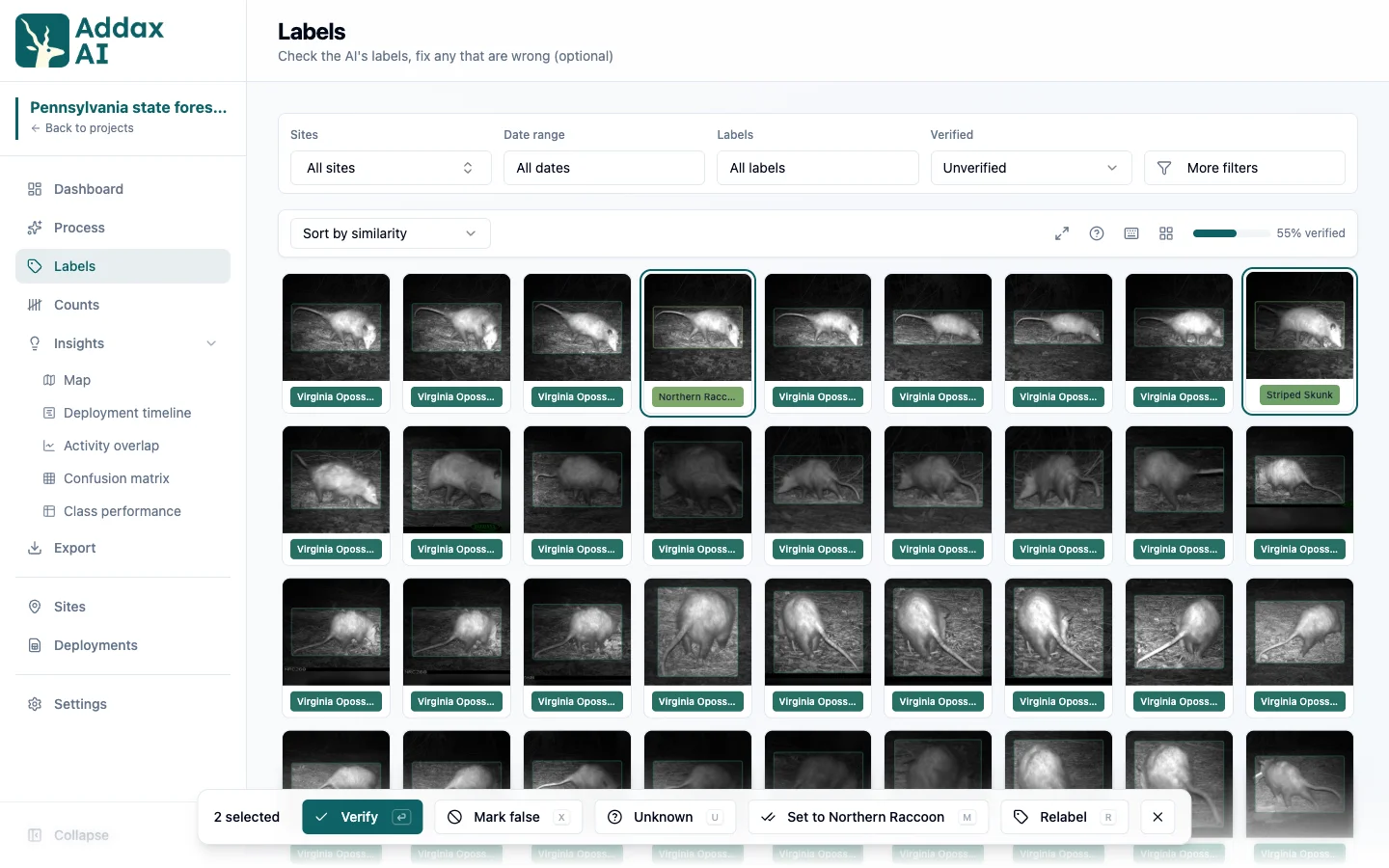
You can switch to sorting purely by similarity. Then animals that look alike sit next to each other across the whole project, so you get a block of opossums, then a block of deer, and your eye only has to notice the odd one out. In the screenshot above every card is an opossum except two. Their label is different, and in a different colour, so they stand out at a glance.
Both need the embedding model. Without it, sorting falls back to date order.
Handle a group at once
Work in bulk, not photo by photo. Select a group of cards, then apply one action to all of them: verify the ones that are right, relabel the ones that are wrong.
A fast way is to sort per event and use the keyboard. Press E to select the whole event, then M to set it to the majority label. This is very fast if your independence interval fits your ecological context and few events hold more than one species, since then most events are a single species.
The other keys: Enter verifies, R relabels, X marks a false detection, U marks it unknown, and 1 to 9 apply your saved labels. Made a mistake? Ctrl+Z (Cmd+Z on Mac) undoes it, as many steps back as you need. The keyboard icon in the toolbar lists every key and lets you set the 1 to 9 slots.
Verified cards are hidden by default, so every group you clear leaves the grid.
Suggestions
The app can point out likely mistakes for you. It pairs the AI's labels with the embedding model: for each animal it looks at its closest look-alikes, and if they mostly carry a different label, it flags that as a suggestion. A detection labelled "canis" whose look-alikes are all "domestic dog" is the classic case.
When the toolbar shows a suggestions badge, click Review. The suggestions come grouped into cohorts, one fix each. Accept relabels and verifies the whole cohort in one click. Dismiss hides it and changes nothing.
Filters
Filters narrow the grid by label, verified status, site or date range. Similarity sorting works best when you do not filter to a single species. If you show only wolves, every card says wolf, so nothing stands out and the odd one is invisible. Filter to a broader group instead. If wolves are your target and you cannot review everything, filter to all canids in the taxonomic filter. A wolf mislabelled as a coyote then shows up among the real coyotes, where it is easy to catch.
Your corrections win over the AI's
Once you correct a detection, reprocessing and threshold changes leave it untouched, so your correction stays. Re-running the AI is the exception: it re-analyses from scratch and overwrites everything, including your corrections. See confidence and verification.
Labels are not counts
Checking labels answers which species. It does not answer how many, and it does not confirm any count. The dashboard tracks the two separately, which is why "labels verified" and "counts confirmed" show different numbers: one counts files, the other counts events. The most efficient and least noisy order is labels first, then counts. See confirm the counts.