Confidence and verification
The AI gives two confidence scores, both between 0 and 1. The detector says how sure it is that the box holds an animal. The species model then says how sure it is about the species. You can see both on a marked-up image: this box is 90% animal and 98% coyote.
This page explains where those scores are used, and what happens when you correct something. Both settings below work on the first one, the detector's score.
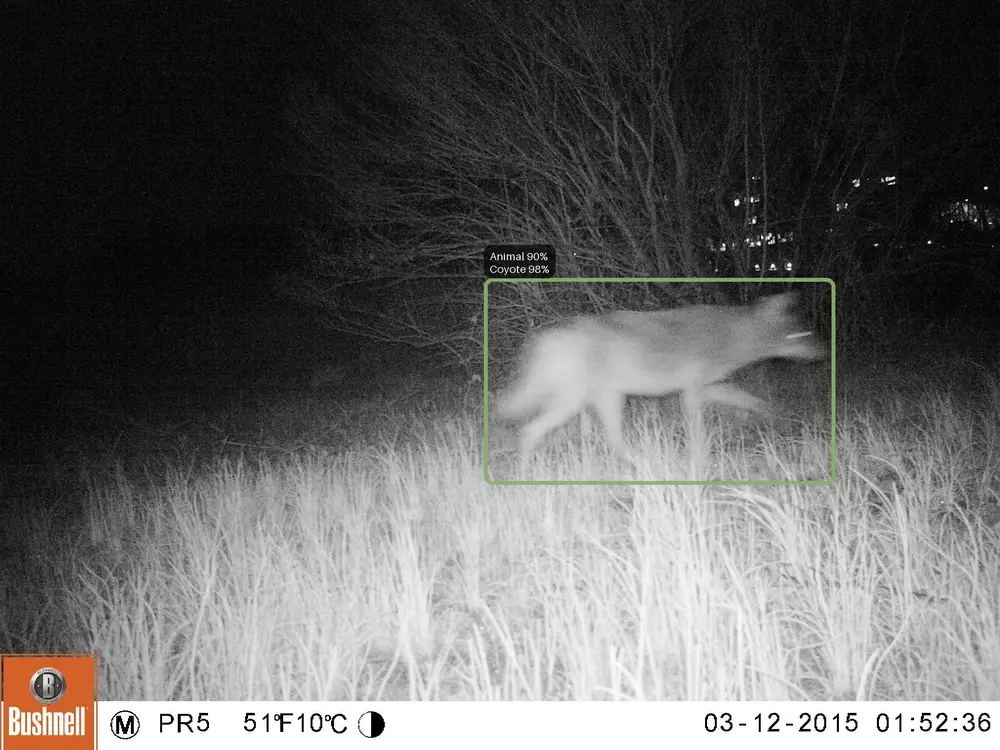
Photo from the ENA24-detection dataset, used under the Community Data License Agreement (permissive variant). Please cite: Yousif H, Kays R, Zhihai H. Dynamic Programming Selection of Object Proposals for Sequence-Level Animal Species Classification in the Wild. IEEE Transactions on Circuits and Systems for Video Technology, 2019.
Two settings
They do different jobs, and it is worth knowing which is which.
1. Which boxes get a species (Classify detections above, default 0.1)
Every animal the detector finds is stored, but not every one is sent to the species model. Only boxes above this score get a species, so weaker ones stay as plain "animal". The same score decides which boxes get an embedding, so a box below the gate also stays out of the similarity sort and never gets a suggestion. Raise it to save time on a big folder, or lower it if you think real animals are being missed. This one applies while the AI runs, so changing it only affects new analyses.
2. What you see and what gets counted (Count detections above, default 0.2)
This is the one most people are looking for. Detections below it are hidden from the grid, the charts and the counts. Change it any time: the app just shows more or less, so you can lower it later and see more without running the AI again. Files you verified on the Files tab are the exception, because verifying a file marks its weak boxes as false detections, and those stay hidden at any threshold. Leave it at the default while you check labels.
So what does species confidence do?
Low species confidence does not hide a detection, it changes the label. The app falls back to a broader group, for example "felidae" instead of a specific cat. You can turn this off in the project settings, and then you keep the model's best species guess. See how labels get cleaned up.
You can still filter on it while you work. Under More filters on the Labels page there are two confidence sliders, one for the detector's score and one for the species score. They only change what the grid shows you at that moment. Your data, your counts and your exports stay as they are.
Verified detections always count
Anything you verified always counts, whatever its score. If you confirm a bobcat at 0.04 confidence, it stays in your counts and charts even though your threshold is 0.2. Your judgement beats the model's score, and this is why your numbers do not drop when you raise the threshold after checking things.
What happens when you correct a label
The app keeps both versions: what the AI said, and what you changed it to. Reprocessing and changing a setting skip verified detections, so your correction stays. One thing does wipe it, and that is re-running the AI, which deletes the results and analyses the folder again from scratch, including your corrections. The app warns you first.
Keeping both versions is also what makes the confusion matrix work. It compares your verified label against the label the app showed you before you touched it, using only detections you actually verified. That label is the one after cleanup, not the raw model output, so the matrix scores the whole pipeline: model plus rollup plus smoothing. See how labels get cleaned up.