Where your files live
AddaxAI keeps three things in three places, and it needs all three to work properly. So if you ever move your work to another computer, make sure all three come along.
1. Your photos and videos
Wherever you put them. AddaxAI never moves, changes or deletes your originals, it only reads them. What it stores is the path to each file, so it expects the folder to stay where it is. Moving a folder is not a disaster, the app helps you reconnect it.
2. Results next to your photos
Inside each analysed folder AddaxAI writes a hidden .addaxai folder. It holds the raw model output and, for videos, one frame per clip. You never have to open it, and there is nothing in there a normal user should need. AddaxAI uses it to redo work after you change a setting, without running the AI again.
A folder run also saves its own output next to your photos by default: the tables, the recognition file for Timelapse, and a text file describing the run. Those are yours to move, copy or delete, nothing depends on them. See exports.
3. The database
One file holding every detection, label, correction and confirmed count.
| System | Location |
|---|---|
| macOS and Linux | ~/AddaxAI/ |
| Windows | %USERPROFILE%\AddaxAI\ |
This is the default location. The folder can live somewhere else if your organization blocks programs in user folders. The app opens this folder for you from File > Open user data folder. The parts worth knowing about:
| Item | What it is |
|---|---|
addaxai.db | The database. All your work |
backups/ | Automatic copies of the database |
logs/ | Log files, useful for bug reports |
models/ | Downloaded model files |
envs/ | Software the models need |
Anything else in there is managed by the app and you can ignore it. Two files you will see next to the database do matter: addaxai.db-wal and addaxai.db-shm. They hold recent changes that have not been written into the main file yet, so the three belong together. Never copy addaxai.db on its own, use a backup instead.
Backups
The app copies the database into backups/ by itself, and you can make one at any time with File > Back up database. Only the database is backed up. Your photos are not, they are far too large. Back those up the way you normally would. See back up and restore.
When a folder moves
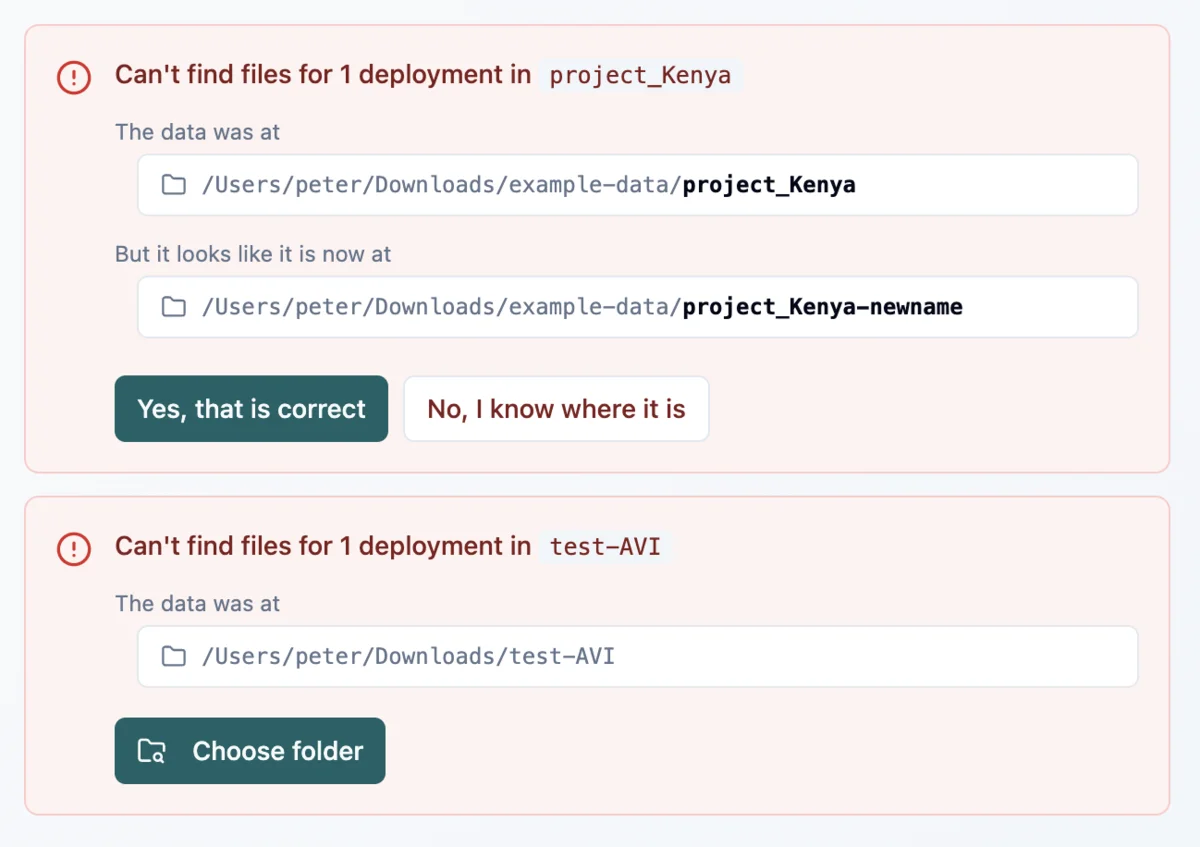
If you move, rename or unplug a folder of photos, the app can no longer find those files. It checks every folder at start and tells you how many are missing. Open the Deployments page and you get a message for each missing folder, with a guess at where it went. One click reconnects every deployment in that folder at once. If there is no guess, or the guess is wrong, pick the folder yourself. AddaxAI compares the files before it accepts a folder, so you cannot point a deployment at the wrong photos by mistake.
The folder itself can move, but what is inside it has to stay the same. AddaxAI looks for each photo at its old place inside the folder, so renaming subfolders or shuffling photos between them means it can no longer match them up. If that has happened, delete the deployment and add the folder again.
Moving photos to another disk on the same computer, like an external drive to free up space, needs nothing more than this: move the folders and reconnect. The backup and restore steps below are only for moving to another computer.
Moving to another computer
To move one project, export it as an AddaxAI bundle with the photos included and import it on the other computer. Nothing needs reconnecting.
To move everything at once, every project and the backups folder:
-
Copy the photos to the new machine, or to an external drive. The
.addaxaifolders sit inside them, so they travel along and you do not have to worry about those. -
Back up the database with File > Back up database, and save it to the same drive. This writes one complete file, which copying
addaxai.dbby hand does not. See back up and restore. -
On the new machine, use File > Restore from backup and pick that file. The app restarts with your work in place. This replaces whatever database the new machine had. Your models do not travel with the backup, so the first analysis downloads them again. Do that while you still have a good connection.
-
Open your project. The paths have changed, so the deployments come up as missing. Reconnect them.